YOUR PROGRAM, FROM BREEDING TO GO-HOME

Dog breeding software features

Keep the work around each litter connected. Track breeding and puppy care, get to know interested families through applications, and bring their contracts, invoices, and updates together.

D 0-14, HEAT & PROGESTERONE

01 · TIMING

Progesterone tracking and breeding timing

Keep every progesterone result with the heat cycle it belongs to. The chart shows recorded values over time, interpretation zones, and estimated timing in one view.

Review the current trend alongside previous cycles and keep the dates and results ready for your reproductive vet. Heat predictions draw on her recorded history, so your planning starts with the records you already keep.

  • Dated progesterone results and trend charts
  • Estimated breeding windows for your selected method
  • Heat-cycle history and predictions per female
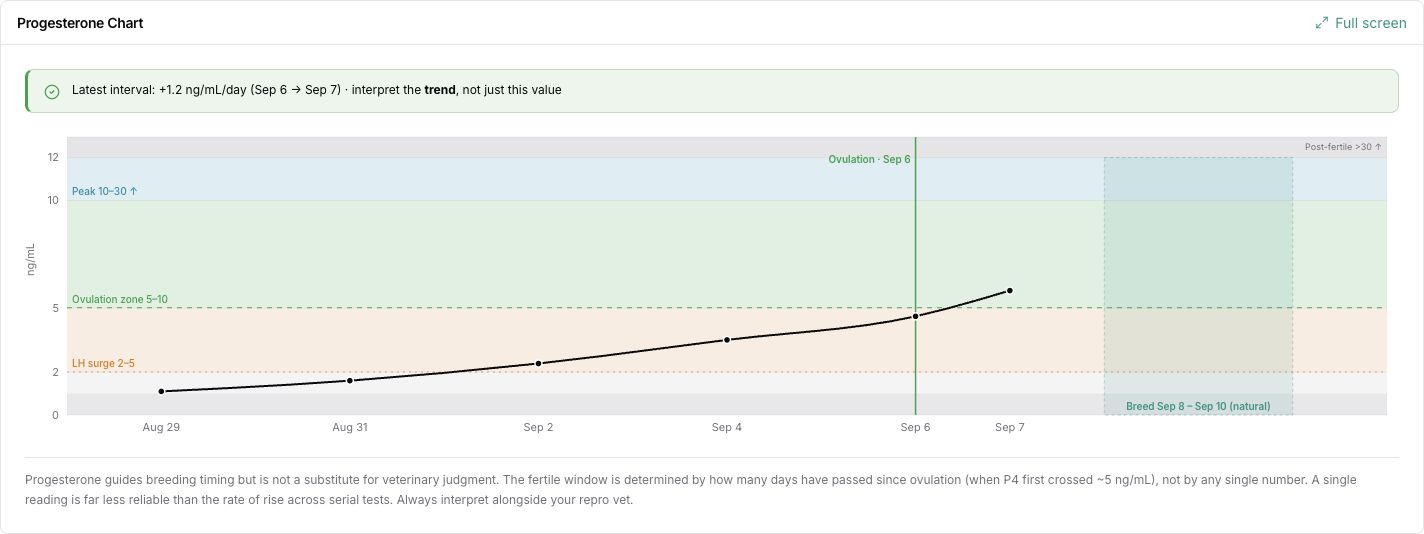
Recorded progesterone results across six dates in a sample heat cycle, with estimated timing and the chart’s veterinary-judgment note.
Recorded progesterone results with estimated timing. Shown with sample data. Select the image to view it full size.

Time your next breeding on data.

Start free

Free for up to 4 litters a year · No credit card required

D 58-63, GESTATION

02 · WHELPING & LITTERS

Whelping countdowns, weights, and litter records

Keep the expected due date, whelping record, and puppy details together. Your litter record follows the work from pregnancy through birth and the weeks that follow.

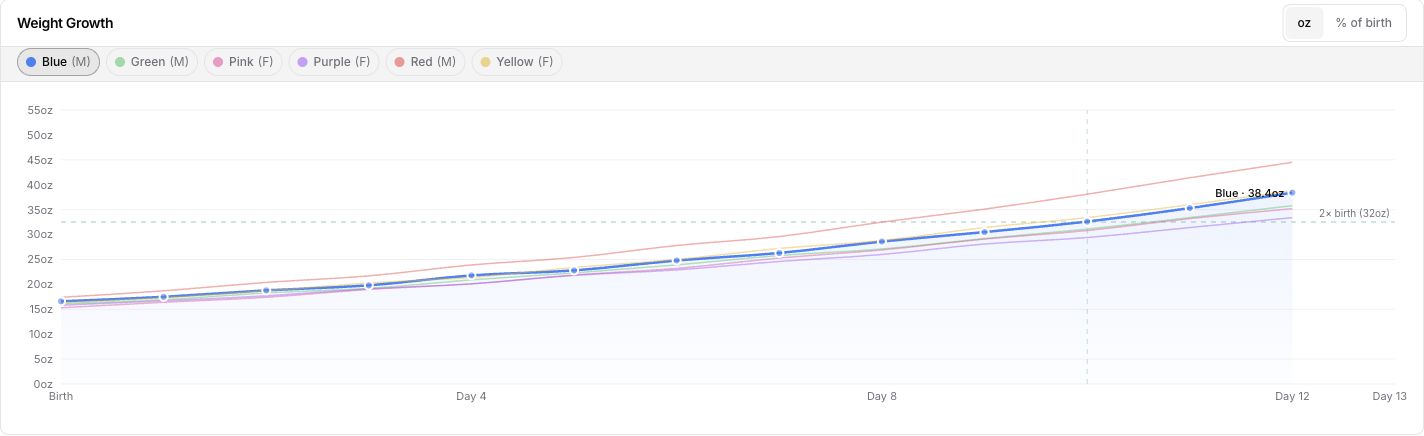
Log weights by puppy and see each growth curve over time. Collar colors help you follow individual littermates, compare recent readings, and bring a clear weight history to a conversation with your vet.

  • Whelping countdowns and birth records
  • Weight entry for the litter and individual puppy histories
  • Growth charts, health records, and vaccination schedules
BreedTracker Weight Growth chart in ounces, with Blue selected and the other five littermates visible for comparison.
Recorded puppy weights in ounces, tracked over time. Shown with sample data. Select the image to view it full size.

D 63, WHELPED

Keep your next litter’s records together.

Start free

Free for up to 4 litters a year · No credit card required

FAMILIES, INTEREST TO PLACEMENT

03 · APPLICATIONS & BUYERS

Puppy buyer applications, with your questions

Share a public litter page where families can see your puppies, follow updates, and get in touch. When you want to learn more about a family, send them an application with the questions that matter to your program.

Litter page sharing guide

Families complete the form through an emailed link. Their submitted questions and answers stay with their customer record, even when you change the form later. You decide who joins your waitlist and which family is right for each puppy.

Start with the free buyer questionnaire for printable and editable questions, or follow the application setup guide to create and send your form.

  • Custom questions with required or optional answers
  • Application requests from your public litter page
  • Customer preferences, waitlist matches, and puppy placement
  • Deposits and pick order kept with the buyer

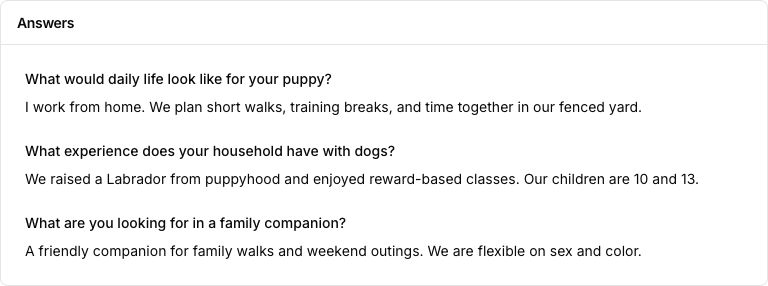
Their answers stay with their customer record

Saved application answers about daily life with a puppy, experience raising dogs, and hopes for a family companion.
Alex’s submitted answers stay with the customer record. Your form uses your questions. Shown with sample data. Select the image to view it full size.

Puppy waiting lists and reservations

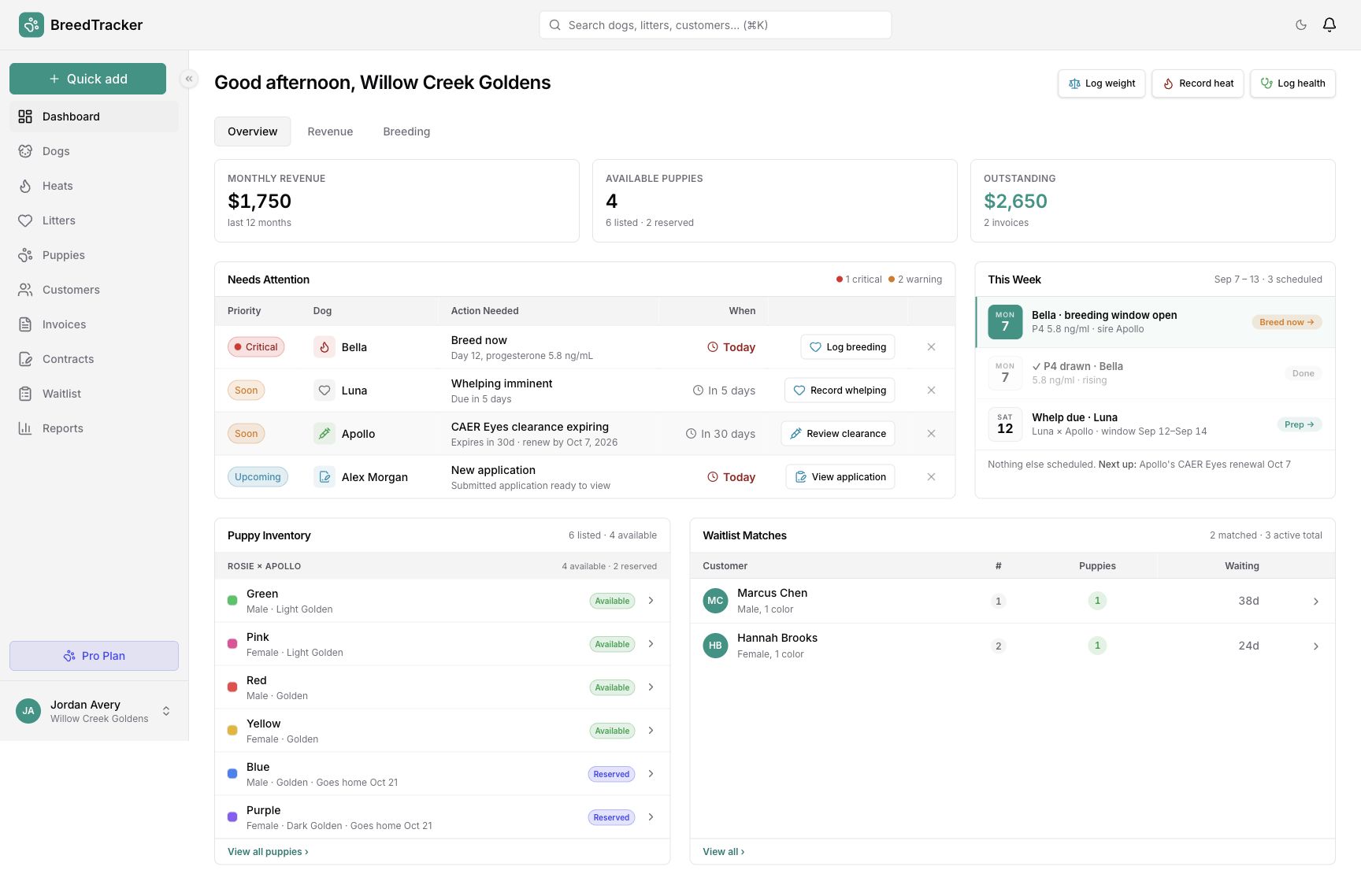
Add a family to the waiting list for their breed, with their sex and color preferences. They join at the end of the list; you can move their place as plans change. Your dashboard shows available puppies and waitlist matches to review.

Choose the family and confirm the puppy match yourself. That reserves the puppy and creates a draft invoice. Record a deposit then, or keep the draft until you are ready to send it. An application alone does not reserve a puppy.

Customer and waiting-list management are included on Free. If you cancel a match and return the family to the list, they rejoin at the end.

See how to manage the list and match a puppy
BreedTracker dashboard for Willow Creek Goldens, with breeding and whelping tasks, a new application from Alex Morgan, puppy availability, and waitlist matches.
Puppy availability, a new application, and waitlist matches on the dashboard. Shown with sample data. Select the image to view it full size.

Contract templates and e-signatures

Keep a signed agreement with the customer or puppy it belongs to. Upload contracts you signed elsewhere on any plan, and choose whether to share each one in the buyer portal.

With Pro, send contracts from your templates for e-signature, follow signing progress, and send a reminder when needed. The completed contract stays with the record.

Signed-contract uploads are included on Free. E-signing requires Pro and costs $1 per contract sent, shown before you send.

A customer’s Contracts card shows an uploaded deposit agreement marked Completed, plus a puppy purchase agreement waiting on the buyer with dated signer progress.
Contract records kept with their customers and puppies. Shown with sample data. Select the image to view it full size.

A private buyer portal for the wait ahead

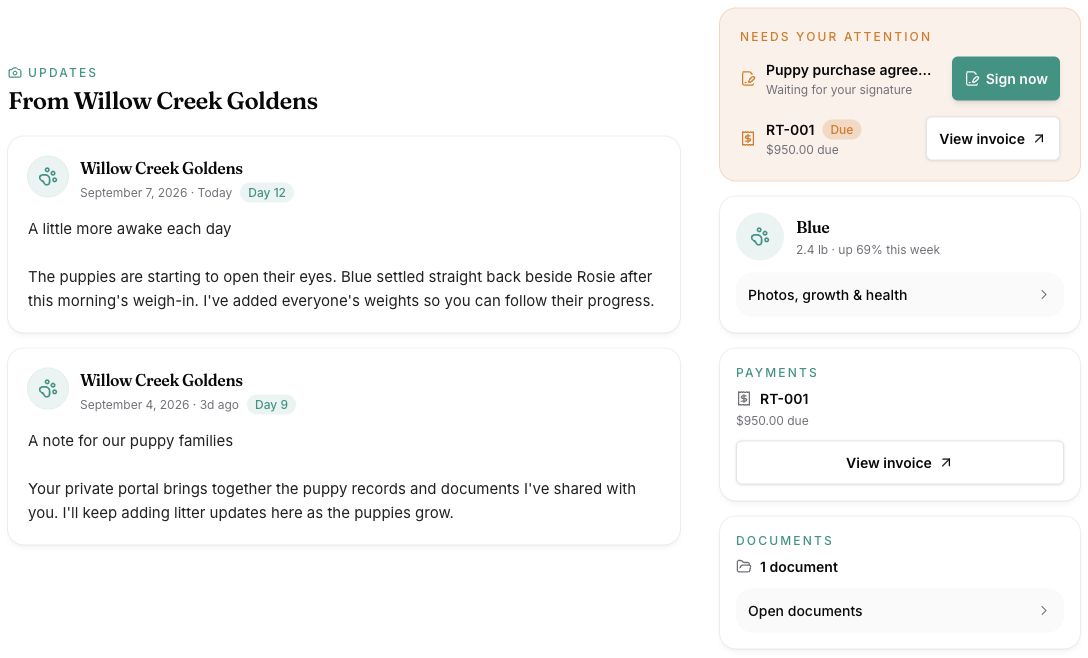
Invite families to a private place for litter updates, puppy photos, growth charts, and health records. Share a new post with the litter’s families so they can follow along as their puppies grow.

Choose each person’s access and which notes, files, and uploaded contracts you share. Full portal access includes shared documents, contracts, and invoices; invoice records keep deposits, payments, and outstanding balances together.

Public litter sharing and private buyer portals are included on Free. Applications are completed through their own emailed links.

A sample buyer’s private portal shows litter updates from Willow Creek Goldens, Blue’s growth summary, a contract awaiting signature, an invoice balance, and shared documents.
A family's view of the updates and records shared with them. Shown with sample data. Select the image to view it full size.

W 8, PUPPIES GO HOME

Bring your next family into BreedTracker.

Start free

Free for up to 4 litters a year · No credit card required

04 · REVENUE & REPORTS

Revenue and reports from the records you keep

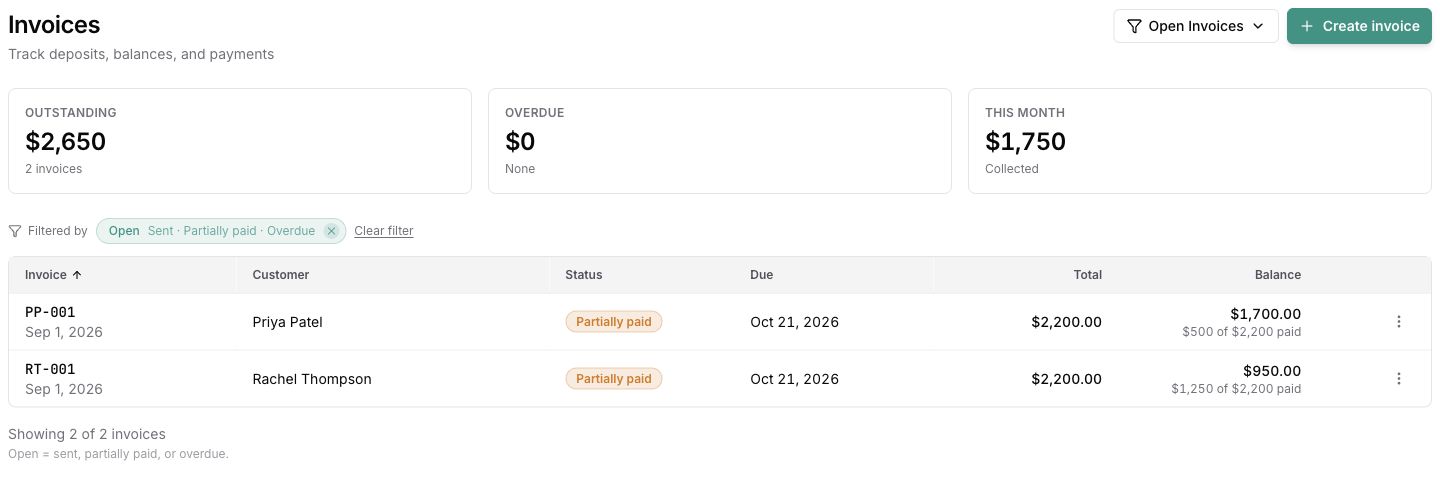
Keep invoices, deposits, payments, and expenses connected to your customers and litters. See what has been paid, what is still owed, and how each litter contributes to your program.

When you need a closer look, reports bring those records together. Pro adds advanced reports for revenue, litter performance, buyer history, and health compliance, plus report exports for the records you need to share or keep.

Start with the Puppy Disposition Board, Sales Pipeline & Sources, or Waitlist & Reservations on Free. The reports guide shows which report answers each question and which exports require Pro.

  • Invoices with deposit, payment, and balance tracking
  • Breeding, health, and financial reports from your records
  • Advanced reports and report exports with Pro
Two sample family invoices show recorded payments and remaining balances: Rachel Thompson owes $950 and Priya Patel owes $1,700.
Invoices, recorded payments, and the balance still owed. Shown with sample data. Select the image to view it full size.

See what your program actually earns.

Start free

Free for up to 4 litters a year · No credit card required

05 · PEDIGREES & HEALTH

Health clearances and certificates by dog

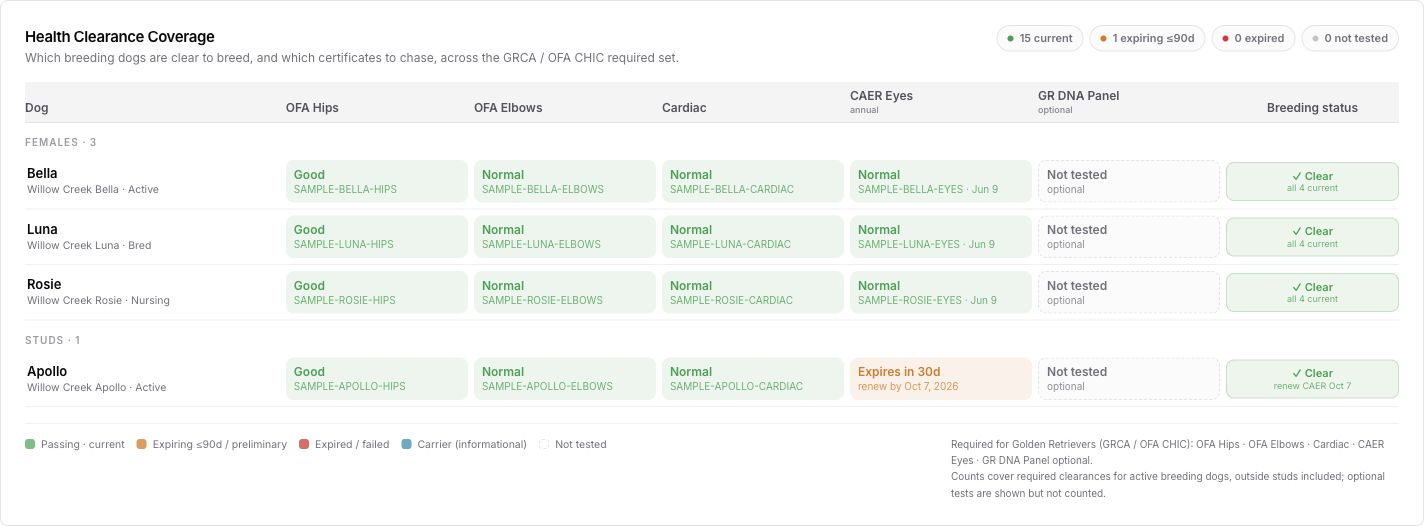
Keep each clearance with its exam date, result, certificate number, and attached document. The overview brings recorded results across your dogs into one place, so you can see which records are missing or approaching their expiry date.

Every result stays attached to the dog it belongs to: documents uploaded and stored, expiration dates tracked with renewal reminders, clearance status visible at a glance. Pedigree records and documentation live alongside, so a buyer packet or stud inquiry can draw on the same records. Pro includes report exports when you need a copy to share.

See how to record and renew a health clearance. Confirm testing requirements with the relevant breed program and your veterinarian. A recorded result does not certify breeding suitability.

  • Exam dates, results, certificate numbers, and documents
  • Expiration tracking with renewal reminders
  • Clearance summaries for puppy-buyer packets
  • Health compliance reports and report exports with Pro
  • OFAhip & elbow clearances
  • CHICregistry numbers
  • DNApanel results per dog
  • Vet visitsdated logs
Health clearance coverage for four sample Golden Retrievers, showing recorded hip, elbow, cardiac, and eye results, with Apollo’s eye renewal approaching.
Health clearances and recorded results across the program. Shown with sample data. Select the image to view it full size.

Keep every clearance one click away.

Start free

Free for up to 4 litters a year · No credit card required

Frequently asked questions about the features

Run your whole program in one place

Start with your current litter or your next interested family. Your free account has no trial clock and needs no credit card.

Start free

Free for up to 4 litters a year · No credit card required

Compare plans in detail