PLANS, RECORDS & BUYER WORKFLOWS
Find the best dog breeding software for your program
Compare the records you need, the way families apply, and what each plan includes. Then try the workflow you will use with your next litter.
Published by BreedTracker, which is included below. We reviewed the linked vendor pages and US App Store listing on . Competitor features are vendor descriptions; we have not tested their paid products. This is a selected comparison, not an independent ranking or a complete market survey.
Listed prices are in US dollars, before any applicable taxes or extra fees. Confirm current plans with each vendor. An omitted feature is not evidence that a product lacks it.
Up to 4 litters a year · No credit card required
Dog breeding software plans compared
Start with the plan limits, then check the workflow. Each source link takes you to the vendor information used for that entry.
On a small screen, scroll the table sideways to read each column.
| Product & price | Getting started | Records & workflow | Before you choose |
|---|---|---|---|
BreedTracker Our product Free; Pro $14.95/month or $149.95/year Plans and limits | Free includes unlimited dogs and up to 4 litters per calendar year. | Heat and litter records, puppy weights, buyer applications, waitlists, invoices, and a private buyer portal. Signed-contract uploads are included on Free. | E-signing, advanced reports, and report exports require Pro. E-signing adds $1 per contract sent. Try your own records in the free plan. |
BreederCloudPro Standard $6.99/month; Pro $13.99/month Vendor plans and features (opens in a new tab) | 30-day trial. Dog Standard lists up to 10 active dams; Pro lists unlimited dams. | The vendor lists pedigrees, medical and litter records, applications, contracts, a pet portal, financial management, and multiple users. | Review the plan for your species and dam count. Test the portal and payment workflow with the devices and records you use. |
BreederBuddy $29.99/month or $300/year Vendor plans and features (opens in a new tab) | 30-day trial; the published plan includes unlimited dogs, litters, and puppies. | The vendor lists health and pedigree records, heat tracking, applications, waitlists, contracts, payments, a buyer portal, and multiple users. | A breeder website is a separate $29.99/month add-on. Check the total for the services you need, including any payment-related fees. |
Breedera Free; Complete $9.99/month or $99.99/year on the US App Store Developer's US App Store listing (opens in a new tab) | The listing describes free dog/litter profiles, weights, heat tracking, and waitlist/contact records. | The developer describes iPhone and iPad access, mating records, growth charts, estimated dates, and records you can export, share, or print. | Treatment records, diet routines, detailed notes, and document/photo storage are listed as subscription features. Confirm pricing for your platform and region. |
BreedTools Free; Pro $9/month or $79/year Vendor pricing and plan comparison (opens in a new tab) | Free includes 10 dogs and 1 active litter. New accounts receive a 30-day Pro trial. | Free lists heat tracking, puppy records, and CSV import/export. Pro lists unlimited dogs/litters, a buyer pipeline, e-sign contracts, and per-litter financial reports. | Compare the permanent Free plan with the Pro trial. Pro lists up to 5 team members and its own photo-storage limit. |
Expert Breeder Free; Builder $15/month; Pro $39/month; Enterprise $79/month Vendor pricing and plan comparison (opens in a new tab) | Free lists applications, a master waitlist, buyer contacts, dog/litter records, and CSV import/export. | Builder adds a breeder website, public litter pages, invoices/payment links, e-sign contracts, and a buyer portal. Pro adds messaging and staff access. | Choose the tier around the buyer workflow you need. The published tiers separate core records, website/portal tools, and messaging. |
Also considering The Breeder’s Standard?
PedFast’s 2025 product manual (opens in a new tab) describes configurable pedigrees and PDF output. We have not verified a current purchase price or license, so it is not in the pricing table. Check the current version, device requirements, backup options, and purchase terms before choosing it.
Use the same small trial in each product
Use sample records first. A feature name tells you less than completing the task yourself.
Try one litter from start to finish
Add a dog, record a breeding, open a litter, and enter a puppy weight. Check whether you can find and correct each record on your phone.
Follow one family through the process
Send a sample application, review its answers, add the family to a waiting list, and record a reservation. Check what the family sees and what stays private.
Check the plan after the trial
Compare dog and litter limits, team access, contracts, payment fees, storage, and exports. An active-litter limit and a calendar-year litter limit measure different things.
Check the records you can take with you
Inspect an actual export or printed record. Confirm which fields, documents, and histories it includes, and whether you need a paid plan to create it.
A CLOSER LOOK AT OUR PRODUCT
BreedTracker: litter records and buyer details together
BreedTracker may fit if you want to keep heat cycles, litter records, applications, waitlists, contracts, and invoices together. Start on Free to see whether the workflow fits your program; e-signing, advanced reports, and report exports require Pro.
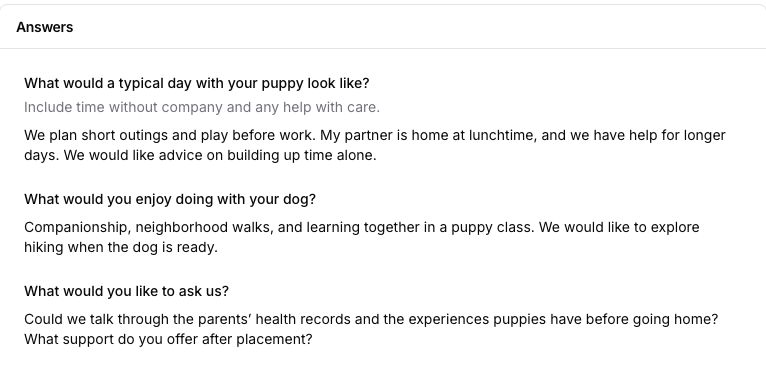
Read the application where you keep the family
Create your questions and email the application. Submitted answers stay on the customer record. You decide who joins the waiting list and which family to match with a puppy.
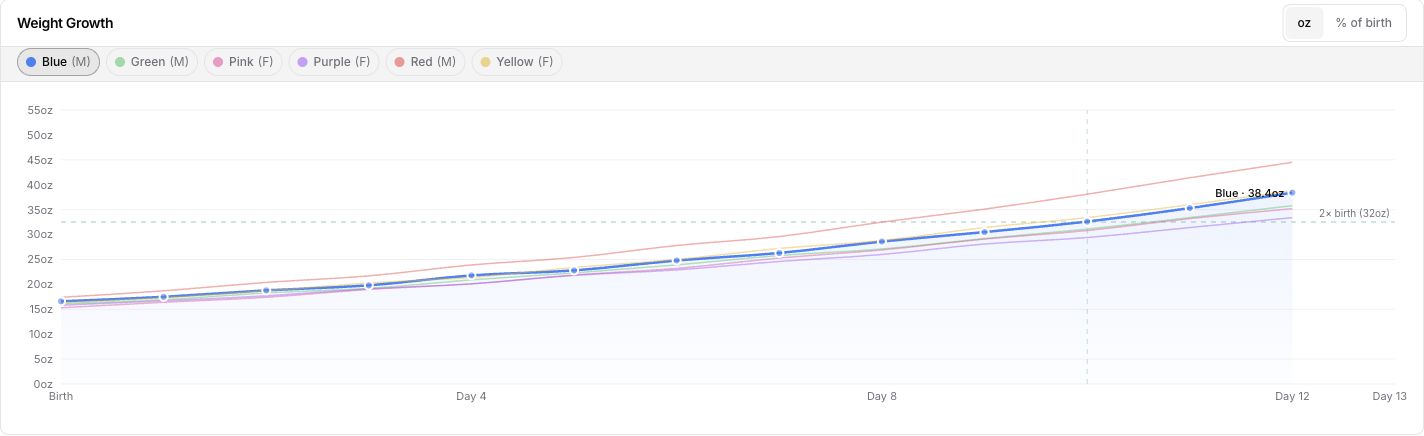
Keep a puppy’s weight history with the litter
Enter each puppy’s measurements and review the recorded curve. The chart organizes observations to share with your vet; it does not diagnose a puppy’s health.
Up to 4 litters a year · Unlimited dogs · No credit card required
Start with a spreadsheet or a printable record
A paper log or spreadsheet can work when you can keep it current, find what you need, and back it up. If you are comparing software, start by identifying the work you want it to handle. These free resources can help with today’s records while you decide.
- Puppy buyer questionnaire — printable and editable questions to adapt for your program.
- Newborn puppy weight log — a blank record for your own measurements.
- Whelping kit checklist — a checklist you can print.
- All free breeder tools — calculators, schedules, and resources without a software subscription.
Questions about choosing breeding software
See how your records fit together
Start with your dogs, a current litter, or your next buyer application.
Start BreedTracker freeUp to 4 litters a year · No credit card required