Record puppy weights and read the growth chart
3 minute readFree planUpdated September 2026
Record weights for the whole litter in grams, ounces, or pounds. Read the growth chart, see each reading's recorded unit, and correct a weigh-in when needed.
In this stage
Expecting a litter
- Create a litter from a recorded heat
- Identify your puppies
- Record whelping and puppy birth details
- Log temperatures before whelping
- Record puppy weights and read the growth chart
- Understand puppy weight alerts
- Track litter care with the checklist
- Share a public litter page with buyers
- Understand the free plan litter limit
On this page
Why it matters
- Record the whole litter's weights on one screen, in grams, ounces, or pounds.
- Each puppy's curve is drawn against an expected band, so a slow gainer stands out.
- A puppy that stops gaining is flagged on the litter page and on the puppy's own page.
Record weights for the litter
- Open the litter and select Record weights.
- Check the Date, which defaults to today, and choose g, oz, or lbs under Unit.
- Enter each puppy's weight, pressing Enter to move down the list.
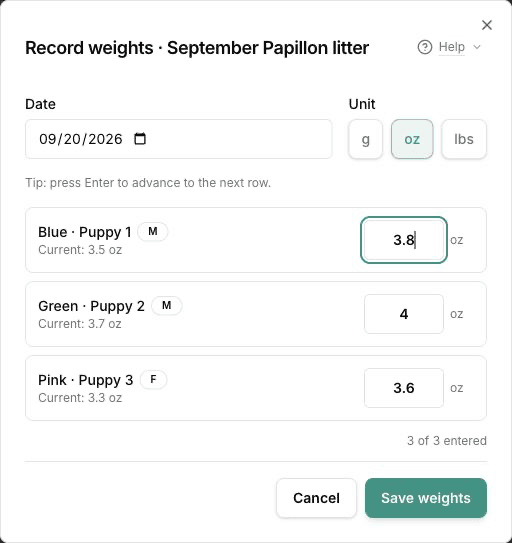
- Select Save weights.
- Select Log another for another day, or Done.
Choose the unit your scale uses. You can use a different unit for later weigh-ins as the puppies grow. Changing the unit converts any numbers already entered without changing the weight they represent. Blank rows are skipped.
A weight far from the last one is flagged as unusual. Save anyway keeps it when it is right.
Your dashboard and your puppies list carry Log weight, which opens the same form.
Read the puppy growth charts
The litter's Weight Growth card draws one line per puppy, in ounces, by day of life. Weights entered in different units are converted to this shared chart scale. Changing entry units does not create a jump in the growth curve.
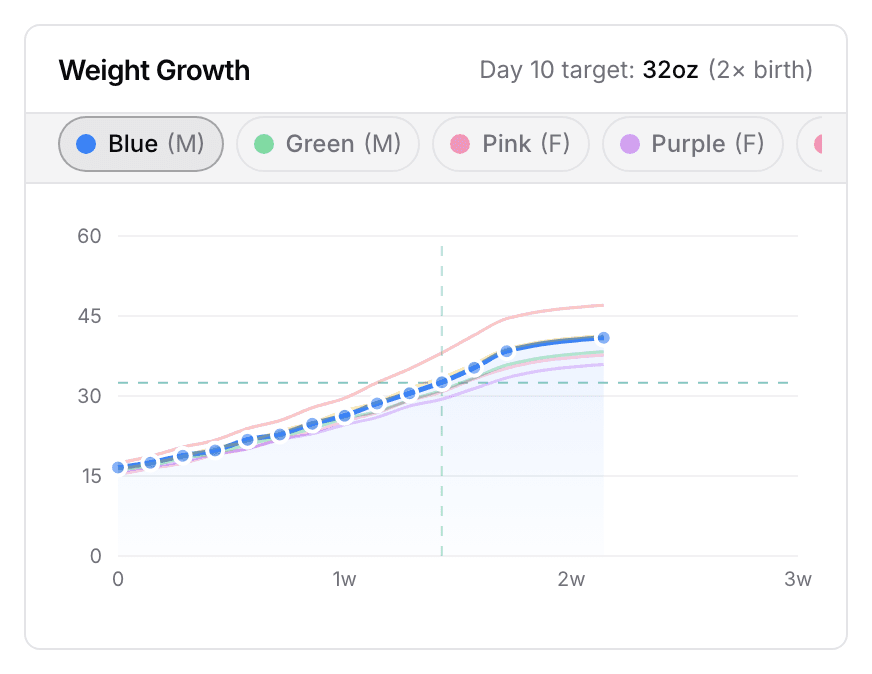
Select a puppy's chip above the chart to bring that line forward. The dashed lines mark the day-10 target, 2× birth. When the chart trims to the days where most weigh-ins are, Show all brings the rest back.
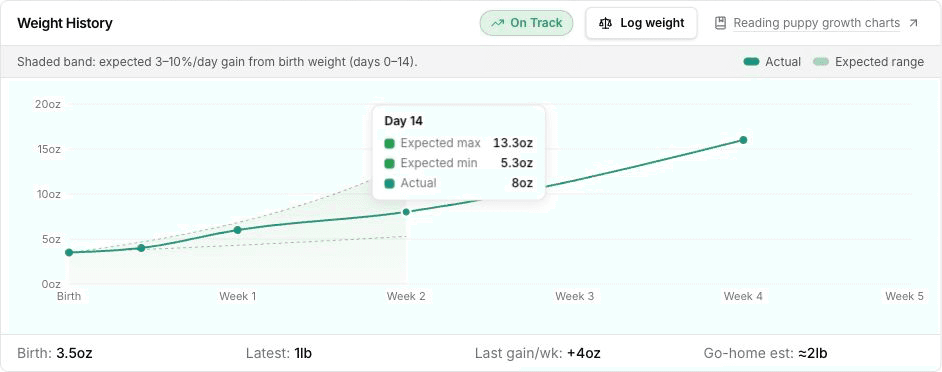
Open a puppy and its Weight History chart shades a band around the line. The band is a gain of 3 to 10 percent a day from birth weight. It is a general guide for newborn puppies, not a figure for your breed. A line drifting below the band is the puppy to look at.
Hover over a reading. The Actual label shows the number and unit you recorded. The chart axis and expected range stay in ounces. The puppy's birth weight and Weigh-ins table also keep their recorded values and units.
Older records may not have a saved entry unit. For those, the app chooses grams below one ounce, ounces below one pound, and pounds from one pound upward. A missing weight is shown as unavailable, never zero.
Correct a puppy weight entry
Open the puppy's page and find the Weigh-ins table. The menu on each row offers Edit and Delete. Entering the same date again adds a second weigh-in rather than replacing the first, so use Edit.
The editor opens with the saved value and unit when available. To correct the weight, choose the unit and enter the corrected number. Changing only the date keeps the recorded weight and unit.
Find weights on puppy and litter pages
The puppy's own page keeps the Weight History chart and every weigh-in under it.
Your public litter page shows each puppy's latest weight while Show weights is on. See Share a public litter page.
Your dashboard raises No weights logged this week only once you have recorded weights before. The reminder stays off until you have started recording puppy weights.
Next
Did this answer your question? If not, we would like to know what you were looking for.
Email support