Check a pairing: COI and clearances
5 minute readFree planUpdated September 2026
Review the dam’s and sire’s health clearance records before creating a litter. BreedTracker also estimates the pairing’s coefficient of inbreeding from recorded pedigree generations.
In this stage
Getting set up
- Set up your kennel and breeds
- Add your dogs
- Add a pedigree
- ProImport a pedigree certificate
- Record health clearances
- Check a pairing: COI and clearances
- Read your dashboard
- Understand Needs Attention
On this page
Why it matters
- Pedigree COI estimates expected inbreeding in offspring of the selected sire and dam.
- The recorded ancestry determines what that calculation can tell you. Missing branches can hide shared relationships.
- Provider DNA results and health clearances give you separate information to review alongside the pedigree.
Check the pairing’s COI estimate
The estimate sits where you name the parents, on the New Litter page. Open that page from the heat's Create litter button, as in Create a litter from a heat. The pairing and its COI details are available on phones and computers.
- Check the dam and the sire on the Pairing / Parents card.
- Select Details beside Expected litter COI.
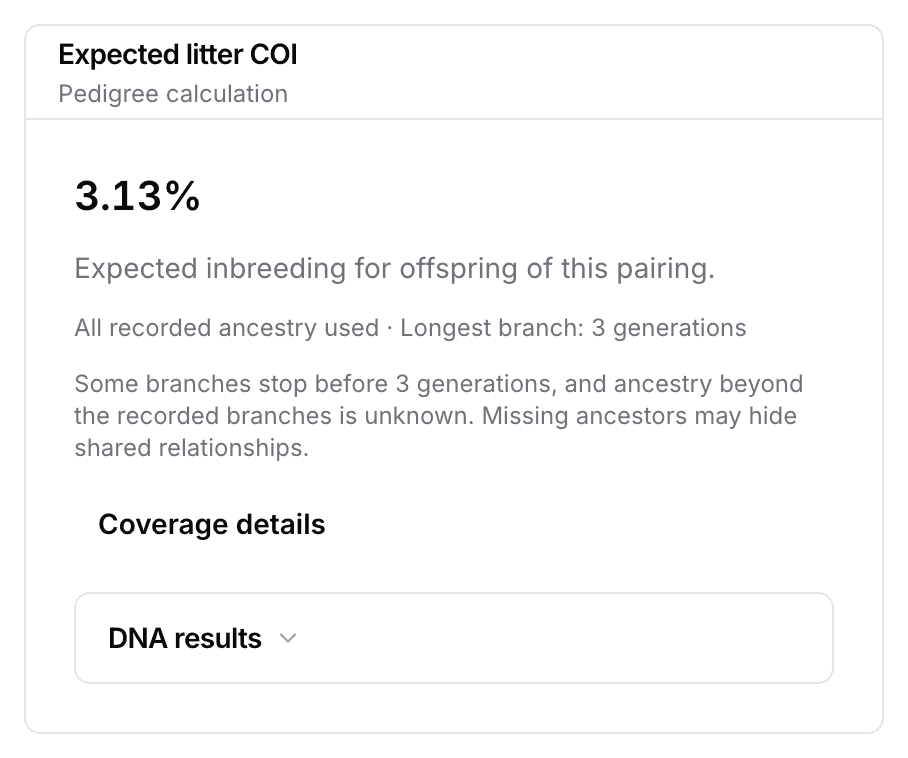
- Read the pedigree result and its ancestry notes, then select Coverage details to inspect each parent's recorded generations.
Read the COI estimate and pedigree coverage
All recorded ancestry used means the calculation used the ancestry available in your records. It does not mean the pedigree is complete. Longest branch is the deepest recorded line, not the depth reached by every branch.
Coverage details shows complete generations separately for the dam and sire, followed by recorded positions at each generation. One ancestor can occupy several pedigree positions, so those counts are different from the number of unique dogs. Ancestry beyond the recorded branches remains unknown even when every position in the displayed generations is filled.
Unknown ancestors are assumed unrelated and non-inbred. The result is conditional on the recorded parentage; adding or correcting ancestry may change it. Download calculation evidence saves the input records, calculation method, assumptions, and result as a JSON file. You can use it to check how the figure was produced.
A shared relationship can produce a positive result even in a shallow pedigree. Very small positive results display <0.01%. With limited ancestry, no shared ancestors found does not warrant a zero. If either parent has fewer than two complete generations, this reads Too little ancestry to assess. Neither that message nor a displayed zero establishes that the parents are unrelated.
There are no Low, Moderate, or High bands or confidence ratings. A pedigree COI is an expectation for the pairing. It does not measure each puppy’s DNA or establish that the pairing is suitable. If the pedigree cannot be calculated, COI unavailable appears with the reason instead of a partial result or zero.
Record provider DNA results
Keep a report about an individual dog separate from a provider's estimated litter result for an exact sire and dam. BreedTracker does not average the parents' individual results to predict a litter. It does not calculate genomic COI from an uploaded file.
For an individual report, open that dog's Pedigree tab and expand DNA results. For an exact-pair report, open the pairing's COI details on New Litter, then expand DNA results. Confirm the selected parents before recording the report. The pairing view also lists each parent's individual reports separately.
- In DNA results, select Record result for the dog or pairing you are recording.
- Enter the Testing provider, Reported COI (%), and Report date exactly as reported.
- Select Save result.
You can also enter the report identifier and method or product. Attach the source report as a PDF or image up to 10 MB. Enter a genomic COI percentage, not a diversity or heterozygosity score. These entries are marked as manual and are not independently verified. Different providers and methods may produce figures that are not directly comparable.
Each saved row's actions menu offers Result sources, Edit result, and Delete result. Result sources shows the recorded method and identifier, with Open source report when a document is attached. Older reports remain accessible unless you delete them. To change a parent's individual report from the pairing view, follow Manage this dog's DNA results.
If the result saves but the attachment fails, the form says so. Save again to retry the attachment, or close and attach it later by editing the saved result.
Review both dogs’ health clearances
- Open Dogs and select Health clearances.
- Find the dam under Females and the sire under Studs.
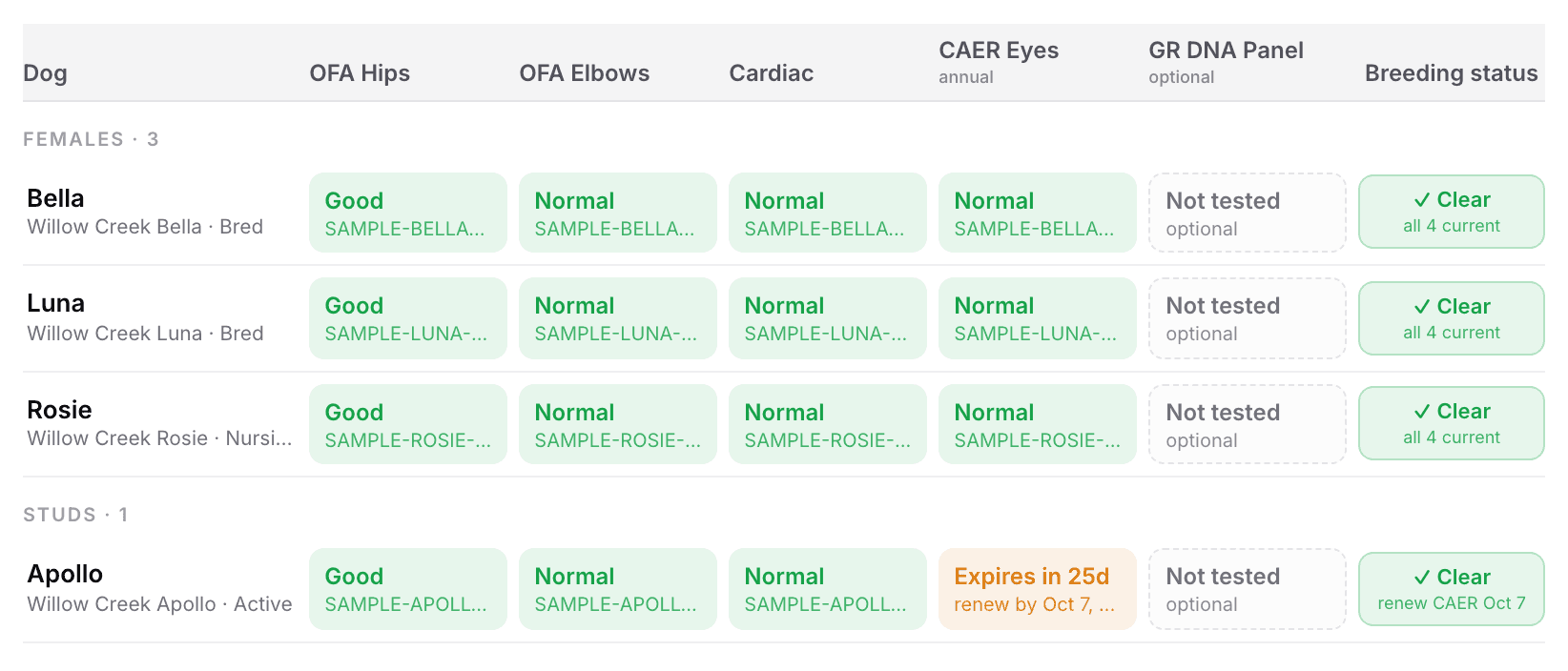
- Read Breeding status on each row, and the reason under it.
Clear, Provisional, and Not clear each carry a one-line reason. carrier-safe pairing on a row means that dog is a carrier. That row does not check the other dog’s results. See Record health clearances.
Add missing pedigree generations
Add ancestors with Add sire and Add dam on the dog's Pedigree tab, or import a pedigree certificate. Fill missing branches and reuse the same dog record when an ancestor appears more than once. Review the source records as well as the depth: a longer branch cannot compensate for incorrect parentage.
Next
Did this answer your question? If not, we would like to know what you were looking for.
Email support